
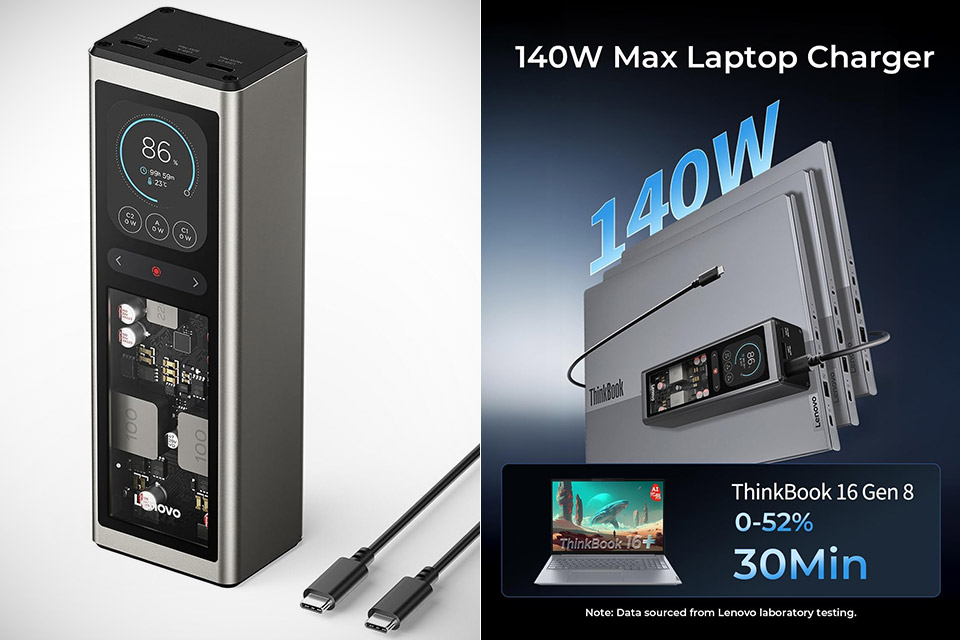
A brushed silver body frames a wide transparent panel that puts the circuitry right in front of you. Four automotive-grade cells, inductors, and chips sit visible behind the clear front, while a recessed 2.01-inch color screen sits above them and tracks every watt in real time. This is the Lenovo thinkplus FLUX 140W, a 20,000 mAh power bank, priced at $74.99 (was $100), built to push a laptop hard and look deliberate while doing it.
The casing is constructed of silver grey plastic that forms the outside shell, and it has ergonomic rounded corners that should feel comfortable in your palm. Its 1.5-inch thickness and dimensions of 6.1 by 2.0 by 1.5 inches make it perfect for fitting inside a laptop sleeve or backpack pocket. It still weighs 15 ounces, which is enough to give it some weight but not too heavy to move. The glass pane set low in the front lets you observe what’s going on inside without any needless frills. The rest of the case has a matte finish, which repels fingerprints better than shiny plastic.

- 20,000mAh Large Capacity Power: The Lenovo 140W laptop power bank is enough to power up the 14" MacBook Pro 16 to 46% within 30 Minutes.Set off on...
- Charge 3 Devices at Once: With 2 USB-C ports and 1 USB-A port,the Lenovo power bank delivers a total output of 135W, enabling fast charging of up to...
- High Definition TFT Display: Stay informed with a 2.01 inches high definition TFT display that shows real-time data on remaining battery capacity...
Just above that clear pane is a recessed display that indicates how much juice is left and how long it will last before dying totally. Big numbers indicate the percentage left and the projected runtime. You have separate readouts for power going via each port, cell temperature, and the input status when the bank is charging. Below the screen are some touch pads that allow you to navigate through power curves, temperature history, brightness, and screen timeout. You can leave the display on indefinitely if you want, or set it to sleep after a while if you don’t need to keep an eye on it all the time. The UI resembles a small dashboard rather than a simple four-LED battery bar.
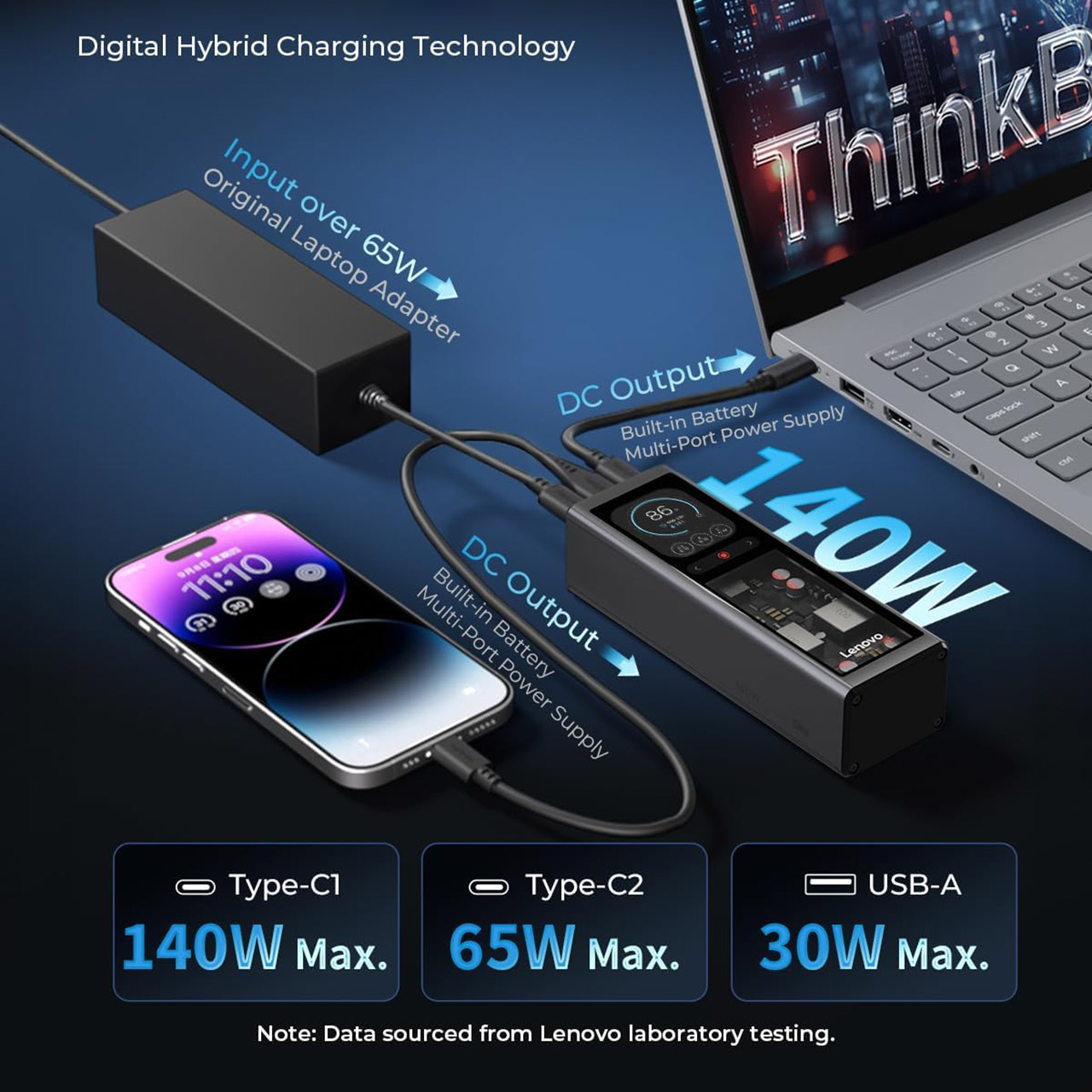
The device has two USB-C ports and one USB-A socket. The primary USB-C port can carry up to 140 watts at 20 volts and 7 amps, which is enough power for many recent laptops, including some Lenovo Legion and ThinkBook models that can manage the greater current. The other USB-C only supports 65 watts, and the USB-A is limited to 30 watts for phones and accessories. Overall, you can get 135 watts across all three ports, and intelligent power sharing ensures that things don’t get out of hand. Both USB-C connections can accommodate up to 100 watts of input, thus the power bank charges quickly. The packaging includes a 1.5-meter 240-watt USB-C cable that supports the full 140-watt output.

The capacity is 20,000 mAh (73 watt-hours), which keeps you within the airline restriction. Real-world statistics will vary depending on the device being used, but Lenovo believes that you can get roughly 3.8 full charges out of this thing on an iPhone 17 Pro Max class phone and slightly more than one complete cycle on a MacBook Air. If you connect a 14-inch MacBook Pro to the high power port, it will charge to approximately 46% in half an hour. Gaming handhelds, tablets, and phones all appear to drain the most power when the various protocols are properly configured. Supports PD, PPS, QC, AFC, SCP, and the higher current profiles seen on select Lenovo and Motorola devices.

Digital hybrid charging is a convenient supplementary function. Plug the bank into a wall adapter, and it will provide power to your device while it recharges. It can even continue to give power to a laptop at around 140 watts as the internal cells charge. When you unplug a device or plug in a new one, multi-port sessions remain stable and simply redistribute power without disconnecting any existing connections. The screen will even alert you if there is a temperature increase that is cause for concern. There are several safeguards in place to prevent overcurrent, short circuits, and ensure that all cells remain balanced.