Samsung’s Galaxy AI Sketch to Image feature is now integrated into Drawing Assist. This means that users will be able to utilize more than a single input, like drawing with the S Pen or one’s finger.
That’s right, they can now turn their ideas into sketches by simply describing the image they want with text, or use voice commands to tell their Galaxy smartphone what to draw, rather than have to draw it out with an S Pen. A combination of these methods can also be employed, such as using the S Pen to draw the facade of a building, and then typing possible locations, like “by the beach” or “up in the mountains”, before Drawing Assist handles the rest.

- MOVE IT. REMOVE IT. IMPROVE IT: Take a great pic, then make it better using Photo Assist¹ with Galaxy AI,² It gives you suggestions for improving...
- NEVER BE LOST IN TRANSLATION AGAIN: Understand text, calls and in-person conversations in another language using real-time translations¹ with Galaxy...
- SLOW-MO MADE SIMPLE: Sometimes you just want to make the moment last longer. Using Instant Slow-Mo¹ with Galaxy AI,² simply tap and hold to replay...
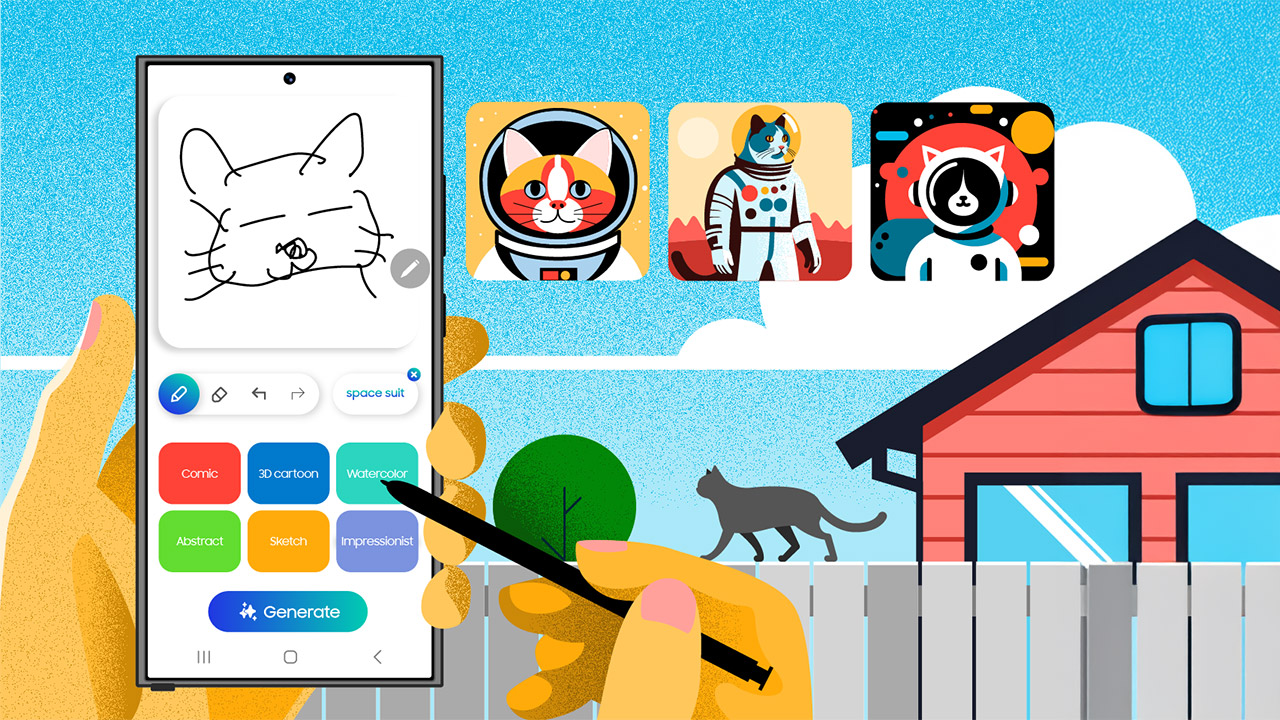
Let’s say you just want to really let your imagination run wild. With Galaxy AI’s multimodal capabilities, you can draw a cat using S Pen and then, type a ‘spacesuit’ to put that cat in a space suit and send it to outer space,” said the company.